
User permission level: Admin, HR
Identify and analyse gender and age pay gaps in your organisation.
Navigate to Analyse Your Company > Pay Equity.
Gender Pay gap filter
Select the Gender pay gap filter at the top, and filter to your chosen view.
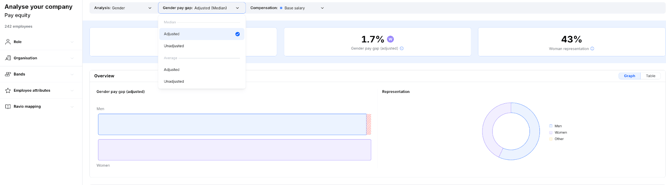
There are 2 different types of gender pay gap:
- Unadjusted - Compares all relevant employees regarding of other factors (ie. level, position).
- Adjusted - Compares all relevant employees doing similar or equal work.
Gender Pay gap can be calculated in 2 different ways:
- Average - Comparing the average of men and the average of women
- Median - Comparing the median man and the median woman
You can find suggested methodologies by clicking the information icon.
Overview
Identify the gaps between Men and Women, and compare this to the representation of each gender in your organisation.

You can view this as a Graph or Table.
Breakdown
Use the Breakdown filters to see priority areas to review.
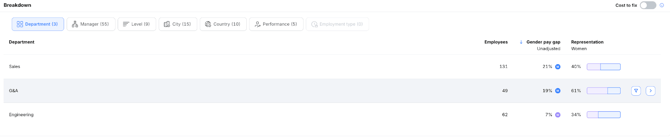
Example:The G&A team in the company above has a gender pay gap of 19% in favour of men, despite the team being represented by 61% women.
You can click the arrow at the end of the row, to see who the employees are in that group.
Cost to fix
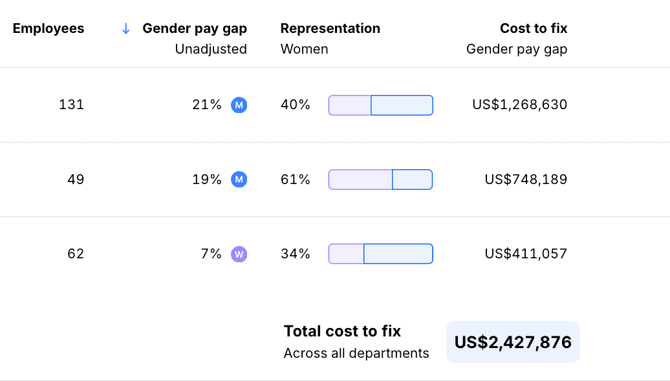
The Cost to fix feature is available when your Gender pay gap filter is toggled to: Unadjusted Average.
This will calculate how much it costs your organisation to fix the gap.

Company filters
You can apply different filters, and analyse select groups in your organisation.
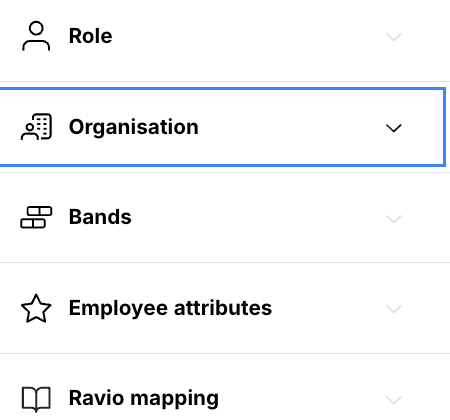
Example: The company decides to filter to the Organisation: Department and review the G&A team in more detail. They use the Breakdown to analyse what factors might be causing the pay difference.